
GravityWrite Alternatives: 7 Better AI Writing Tools
 Machined Content TeamReviewed by Nick Wallace
Most teams don't start looking for alternatives to GravityWrite because something is broken. They start looking because the problem GravityWrite solves quietly changes.
At low volume, one-click generation feels like freedom. Content ships, costs stay predictable, and there's little reason to overthink structure or strategy. Over time, though, patterns begin to repeat. Articles start to overlap. Rankings stall even as output increases. Manual cleanup sneaks back into the process. At that point, the question isn't "how do we write faster?" but "what kind of content system does this site actually need?"
Quick Summary: Looking for GravityWrite alternatives? Scalenut and Writesonic offer broad SEO platforms with structured drafting and research. Frase balances optimization with writing for teams refreshing content. Cuppa delivers high-quality single articles with a strong editor. Machined takes a cluster-first approach for building topical authority. Jasper and SEO.ai serve teams ready to move into enterprise-scale systems rather than simple generators.
That's where GravityWrite alternatives come into play. Not as upgrades in writing quality, but as different answers to a deeper workflow problem.
When GravityWrite Stops Being Enough
GravityWrite succeeds by removing friction. It strips content creation down to the bare minimum: topic in, article out. That simplicity is the point. But the same simplicity becomes a constraint once content volume increases or competition tightens. At $19 to $79 per month, GravityWrite is one of the most affordable generators available, but affordability alone doesn't solve the problems that emerge as a content program matures.
The first pressure point usually appears around differentiation. Articles read well, but they feel interchangeable. Paragraph length, structure, and pacing settle into a predictable pattern that's hard to break without manual intervention.
The next limitation that shows up is strategy leakage. GravityWrite does not decide which pages should exist together, which ones should link, or which topics deserve depth versus breadth. Those decisions fall back on spreadsheets, external tools, or institutional knowledge.
Finally, there's scale friction. Producing more content doesn't always lead to better outcomes. Without clustering, internal linking, or intent separation, sites often add pages faster than they add authority. Over time, this creates volume without momentum, where effort increases but impact stalls.
These aren't design failures. GravityWrite was never meant to solve them. The alternatives we compare here exist precisely because different teams hit different ceilings. As workflows evolve, tools optimized for speed often give way to tools built for structure, strategy, or scale. The right alternative depends on which of those needs has become most urgent.
How to Think About Replacing GravityWrite
Replacing GravityWrite doesn't mean finding a tool that does the same thing with more features. It means identifying the next bottleneck in your workflow. As content programs mature, the constraint usually shifts away from raw production and toward planning, differentiation, or execution at scale.
Some teams need stronger drafts that reduce editing time. Others need research and framing before writing begins. Some want one platform instead of several, even if each feature within that single system is slightly less specialized. And some have moved beyond individual articles entirely and are now seeking topic-level authority. For a broader look at how different AI writing tools handle these needs, see our guide to the best AI writing tools. These needs rarely appear all at once, but they tend to surface as volume, competition, or expectations increase.
The tools we've compared reflect those shifts. None of them are universal replacements. Each one answers a specific "what's breaking now?" question. The goal isn't to find the most powerful tool, but the one that best addresses the current friction in your workflow. That lens makes everything that follows easier to evaluate.
Direct GravityWrite Alternatives
Same core job, stronger drafts or better control
These tools still solve the same fundamental problem GravityWrite does: producing SEO content. The difference lies in how much structure, research, or editorial control they introduce into that process.
Frase
Where Frase Fits Once GravityWrite is Removed
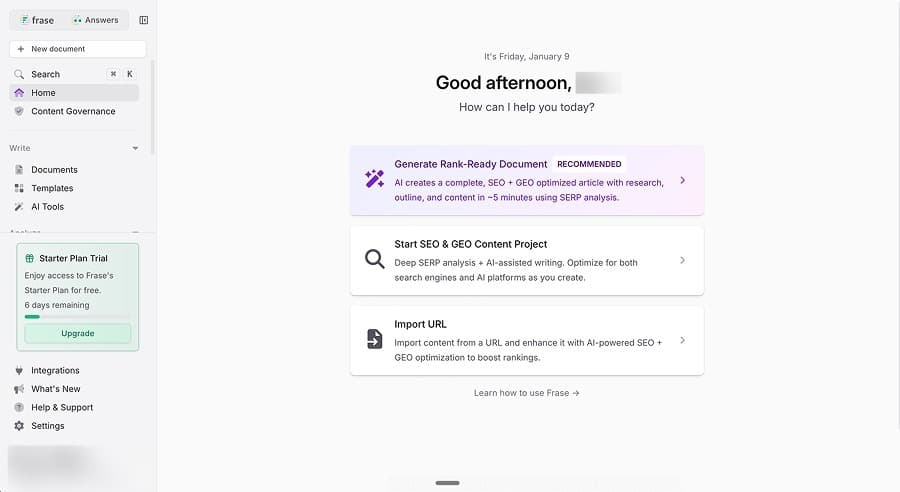
Frase enters workflows when writing stops being the hardest part of content generation. Teams reach for it when coverage, intent, and SERP alignment matter more than raw speed. Instead of starting with a blank page, Frase starts with what already ranks.
The platform blends research, outlining, and drafting into a single workspace. Writers spend more time shaping the article before generation and less time fixing it afterward, which suits teams that want to refine content rather than flood the index. Frase's workflow rewards deliberate coverage instead of volume-driven output.
Pricing
Frase uses a tiered subscription model that ties the cost directly to monthly article limits and feature access. The Starter plan starts at $49 per month and includes 10 AI-optimized articles, basic SERP research, and access to the content editor. This tier works for light usage, but the article cap becomes restrictive quickly once refresh or optimization workflows ramp up.
The Professional plan is $129 per month and expands usage to 40 AI-optimized articles and unlocks research depth, multiple brand voices, and collaboration features. The Scale plan is $299 per month and introduces tracking, monitoring, and multi-brand support, along with 100 AI-optimized articles. However, many advanced features require add-on fees, which means total cost rises as usage expands.
At scale, Frase's pricing behaves predictably, but rigidly. Costs increase in step with article volume, and teams producing content aggressively often hit caps before hitting diminishing returns. The model works best when content cadence is steady and planned rather than driven by spikes in production.
GravityWrite vs. Frase
GravityWrite removes decisions and Frase introduces them. One optimizes for immediacy, the other for alignment. Teams typically switch from GravityWrite to Frase when the question becomes "does this match what's winning?" rather than "can this be written quickly?" That shift signals a change in priorities from speed to competitive relevance.
We Tried It. Here's Our Verdict
Testing produced readable long-form drafts built around solid, SERP-driven outlines. The research layer helped shape article structure early, which reduced the need for heavy rewrites later in the process. The URL import feature stood out for content refresh workflows, allowing existing pages to be evaluated and improved without starting from scratch. This made Frase feel especially effective for teams focused on updating and refining content.
That said, generation interruptions slowed momentum during longer sessions. Drafts occasionally required restarts or manual steps, which made high-volume publishing feel inefficient. In practice, Frase performed best as a planning and optimization tool rather than a bulk content engine, fitting iterative workflows better than high-throughput ones.
Pros
- Strong SERP-driven outlining and refresh workflows
- Research and drafting live in one interface
Cons
- Article caps limit aggressive publishing
- Generation experience can feel inconsistent
Best for: Teams focused on improving and aligning existing content.
Scalenut
Why Scalenut Appeals to Production Teams
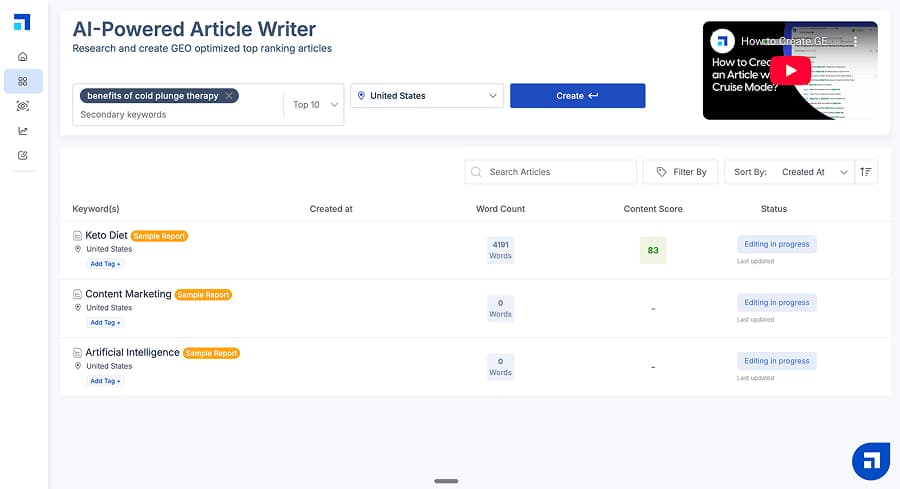
Scalenut optimizes for completeness rather than experimentation. Drafts arrive with tables, FAQs, summary sections, and consistent heading patterns already in place, which reduces editorial back-and-forth and shortens the path from first draft to publication. For teams working with templates, checklists, or repeatable formats, this predictability removes friction and limits subjective revision cycles.
Editors spend less time asking what's missing and more time deciding whether the content is sufficient. The tradeoff is flexibility. While the structure is dependable, it can feel prescriptive, especially for teams that want varied narrative flow or unconventional layouts. Departing from the default format often requires manual restructuring, which shifts some of the time savings back into the editing phase.
Scalenut's Output-Based Pricing Model
Scalenut prices its product around three tiers that bundle "AI visibility" tracking with GEO content creation and optimization. On monthly billing, its Starter plan is $59 per month, its Plus plan is $89 per month, and its Professional plan is $199 per month.
The practical differences in tier show up in the included allowances. Starter includes one workspace (domain), tracking up to 10 prompts on weekly refresh, and a monthly allowance of five GEO articles plus five GEO optimizations.
The Plus plan increases to two workspaces, 25 tracked prompts, 30 GEO articles, 30 optimizations per month, and adds a GEO content audit for up to 200 web pages per month. Plus users also gain access to internal linking, topic gap recommendations, traffic analysis, unlimited tone of voice, and auto-publish to WordPress and Shopify.
Professional expands to unlimited workspaces, 100 tracked prompts, 75 GEO articles, 75 optimizations, and a larger content audit allowance of up to 1,000 web pages each month. This tier also unlocks higher-end features like cannibalization analysis, dedicated support, and access to Perplexity (lower tiers only offer ChatGPT and Google AIO).
In practice, Scalenut's pricing works best when the workflow actually uses both sides of the bundle: AI visibility tracking and creation/optimization. If the workflow mainly needs drafting volume, the AI visibility layer can feel like paid overhead; if the workflow needs visibility reporting plus steady publishing, the tiers map cleanly to growth stages.
GravityWrite vs. Scalenut
GravityWrite favors speed and simplicity, removing decisions so teams can move from idea to draft with minimal friction. Scalenut, by contrast, favors readiness, delivering drafts that arrive closer to a finished state with structured sections, supporting elements, and predictable formatting already in place.
Teams that choose Scalenut over GravityWrite are typically optimizing for stronger first drafts and fewer editorial revisions, even when that tradeoff introduces slower throughput and firmer monthly limits on production.
We Tried It. Here's Our Verdict
In testing, Scalenut produced the most structurally complete article in the group. The draft arrived with comparison tables, FAQ sections, summary blocks, and consistent sectioning already in place, which materially reduced formatting and layout work before publishing. Editors did not need to add supporting sections or reorganize the page to meet baseline completeness expectations, and that alone shortened turnaround time.
Even so, the planning layer felt lighter than the structure suggested. Keyword input relied more on surface-level SERP extraction than on clear intent separation, and clustering lacked signals that would prevent overlap across related pages. Source attribution also remained vague (references implied rather than clearly cited), which shifted responsibility back to the editor to verify claims. The result was a draft that looked finished at a glance, but still required strategic review before fitting cleanly into a broader content plan.
Pros
- Strong default structure with minimal setup
- Consistent long-form output
Cons
- Basic clustering and vague sourcing
- Hard caps limit scalability
Best for: Teams that want reliable, well-structured SEO drafts.
Cuppa
Why Editors Choose Cuppa
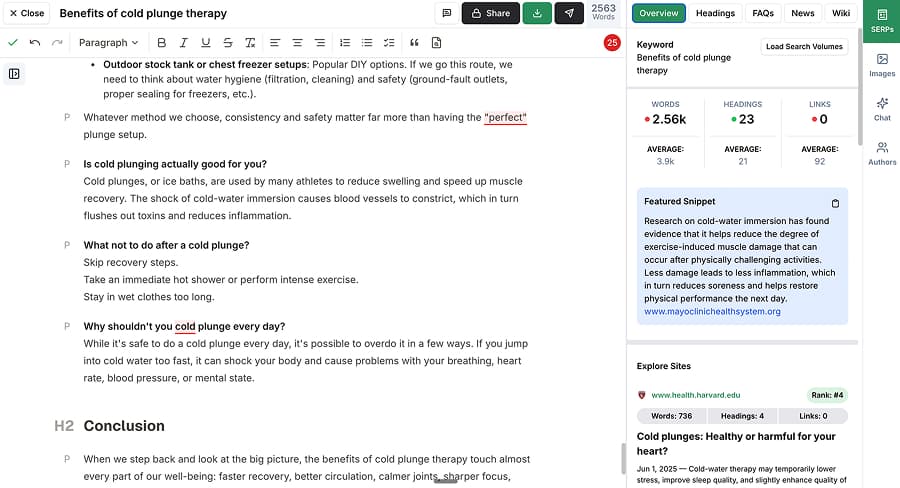
Cuppa centers the editing experience rather than treating it as an afterthought. SERP data, competitive headings, outlines, and guidance live directly inside the editor, which makes mid-draft decisions easier to manage without switching tools or views.
Editors can adjust structure, add questions, or refine emphasis while seeing how those changes relate to what's already ranking, rather than relying on post-generation scoring alone. This tight feedback loop reduces guesswork during revision and keeps changes grounded in search context.
Automation exists, but control defines the platform. Bulk generation and templated workflows are available, yet the system consistently nudges users toward hands-on editorial decisions. That balance suits teams that want AI support without giving up oversight, especially when accuracy, tone, or structure matter more than speed.
How Cuppa Prices its Workflow
Cuppa uses a subscription-plus-BYOK (Bring Your Own Key) hybrid model that can be deceptively complex. The entry plan (Hobby) starts at $38 per month, but this tier covers content generation only. Research, clustering, and strategic features are not included at this level.
To unlock research and clustering, teams must upgrade to the $75 per month Power User tier, and even then, Cuppa requires a separate Perplexity API key to power research, meaning live web search and source discovery are handled externally and then fed into the editor. This means the true cost of ownership includes both the monthly platform fee and external API usage.
Higher tiers, including the $150 per month Business plan and the $250 per month Agency plan, expand team seats, automation, and integrations, but many of the most compelling features remain gated. Cuppa's pricing makes sense for users who value its editor and are comfortable assembling their own research stack, but it requires careful accounting to avoid surprises.
GravityWrite vs. Cuppa
GravityWrite prioritizes automation by design, aiming to remove decisions and compress the path from prompt to publishable draft. Cuppa takes the opposite approach, prioritizing authorship and treating the editor as the center of the workflow rather than a final checkpoint.
SERP context, outlines, and guidance stay visible throughout the drafting process, which keeps writers involved in shaping structure and emphasis as the article develops. Teams that choose Cuppa tend to value that editorial control over raw output velocity, accepting slower production in exchange for drafts that feel more intentional and easier to steer mid-creation.
We Tried It. Here's Our Verdict
In testing, Cuppa produced comprehensive, readable long-form output that compared well with higher-end tools. Drafts covered topics thoroughly without locking into rigid templates, which made it easier to adjust pacing and emphasis during review. The writing felt flexible rather than formulaic, and overall draft quality met expectations for professional SEO content.
The editor stood out as the strongest part of the platform. SERP context, outlines, and inline guidance remained visible throughout drafting, which simplified mid-draft decisions and reduced revision cycles. However, research depth depended on plan level and external configuration. Without upgrades, strategic signals such as intent separation and source-backed framing remained limited, positioning Cuppa more as an editorial workbench than a full strategy engine.
Pros
- Best-in-class editor UX
- High-quality single-article output
Cons
- Research and clustering gated behind higher tiers
- Bulk workflows lack strategy intelligence
Best for: Writers who want hands-on control over every article.
Broader SEO Platforms Built for More Than Drafting
When GravityWrite stops being the center of the stack
These tools extend beyond writing and attempt to manage larger portions of the SEO workflow.
Writesonic
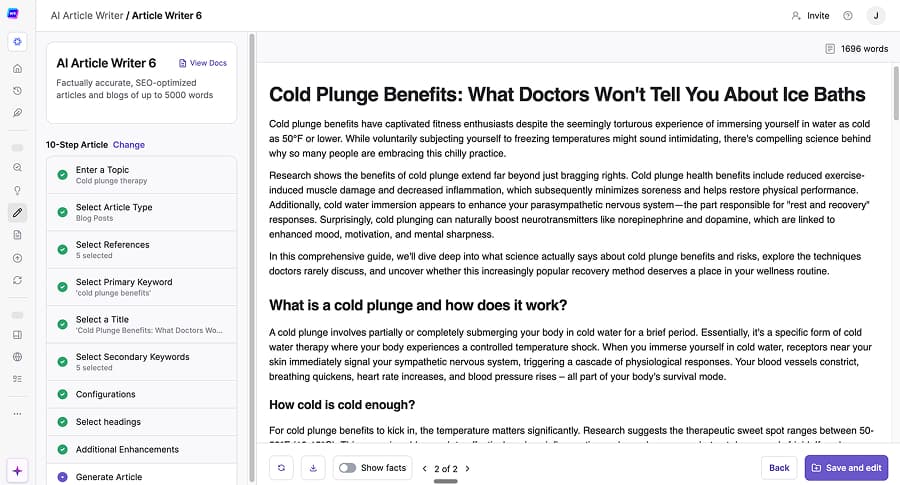
Writesonic behaves more like a full SEO platform than a standalone writing tool. Research, site audits, visibility tracking, and content generation all live inside the same environment, which reduces reliance on multiple subscriptions and minimizes handoffs between tools. Teams can move from keyword discovery to draft creation without leaving the platform, and that consolidation appeals to workflows that value centralization over specialization. In practice, Writesonic feels designed to support end-to-end SEO activity rather than just producing articles.
That breadth comes with tradeoffs. The interface carries more complexity than focused writing tools, and generation speed lags once multiple inputs and research steps are layered in. For teams producing content at scale, slower execution can compound across projects, turning consolidation into friction. Writesonic works best when teams want one system to manage SEO holistically, even if that means sacrificing some speed and simplicity in day-to-day publishing.
Writesonic's Platform-First Pricing Model
Writesonic's pricing reflects its goal of replacing multiple SEO tools. Plans begin at $49 per month for 15 articles, but this Lite tier limits writing styles, projects, and access to advanced features. The $99 per month Standard tier doubles article volume to 30, but still restricts key capabilities.
The Professional plan at $249 per month unlocks GEO features, expanded writing styles, and additional projects, while the Advanced plan at $499 per month increases article volume to 75 and supports larger teams. Even at the highest tier, though, project limits remain a constraint for agencies managing many sites. There is a custom pricing tier that can help with this, but limits still apply.
Writesonic's per-article cost appears reasonable on paper, but generation speed and feature gating can inflate operational cost. The platform rewards teams willing to pay for breadth, not those optimizing for fast, high-volume execution. At scale, time becomes the hidden line item.
GravityWrite vs. Writesonic
GravityWrite optimizes for speed by stripping the workflow down to its essentials and minimizing decision points. Writesonic takes a different approach, optimizing for consolidation by pulling research, audits, tracking, and content generation into a single platform.
That breadth reduces tool sprawl but introduces more steps and configuration along the way. The choice between the two hinges on whether simplicity and rapid execution matter more than having a wide range of SEO capabilities housed under one roof.
We Tried It. Here's Our Verdict
In testing, Writesonic consistently delivered strong, research-backed output. Articles included specific data points, practical guidance, and curated source material that added credibility beyond surface-level summaries. The drafts covered topics thoroughly and reflected clear SERP awareness, particularly when we reviewed and selected research inputs before generation. From a quality standpoint, the content held up well and felt suitable for competitive search contexts.
The friction appeared in execution. Generation regularly took several minutes per article, and that delay became noticeable when producing content in batches. Waiting for drafts to complete interrupted momentum and made iterative workflows feel sluggish, even when the final output justified the extra time. Writesonic ultimately rewarded patience rather than urgency, and will perform best in workflows where depth and consolidation matter more than rapid turnaround.
Pros
- Broad SEO feature set in one system
- Solid research integration
Cons
- Slow generation affects workflow pace
- Restrictive project and user limits
Best for: SEO teams consolidating tools into one platform.
Content Systems Built for Scale and Authority
When individual articles are no longer the strategy
The tools here serve teams that have moved beyond one-off publishing. Their value shows up when content strategy centers on clusters, coverage, and sustained visibility.
Machined
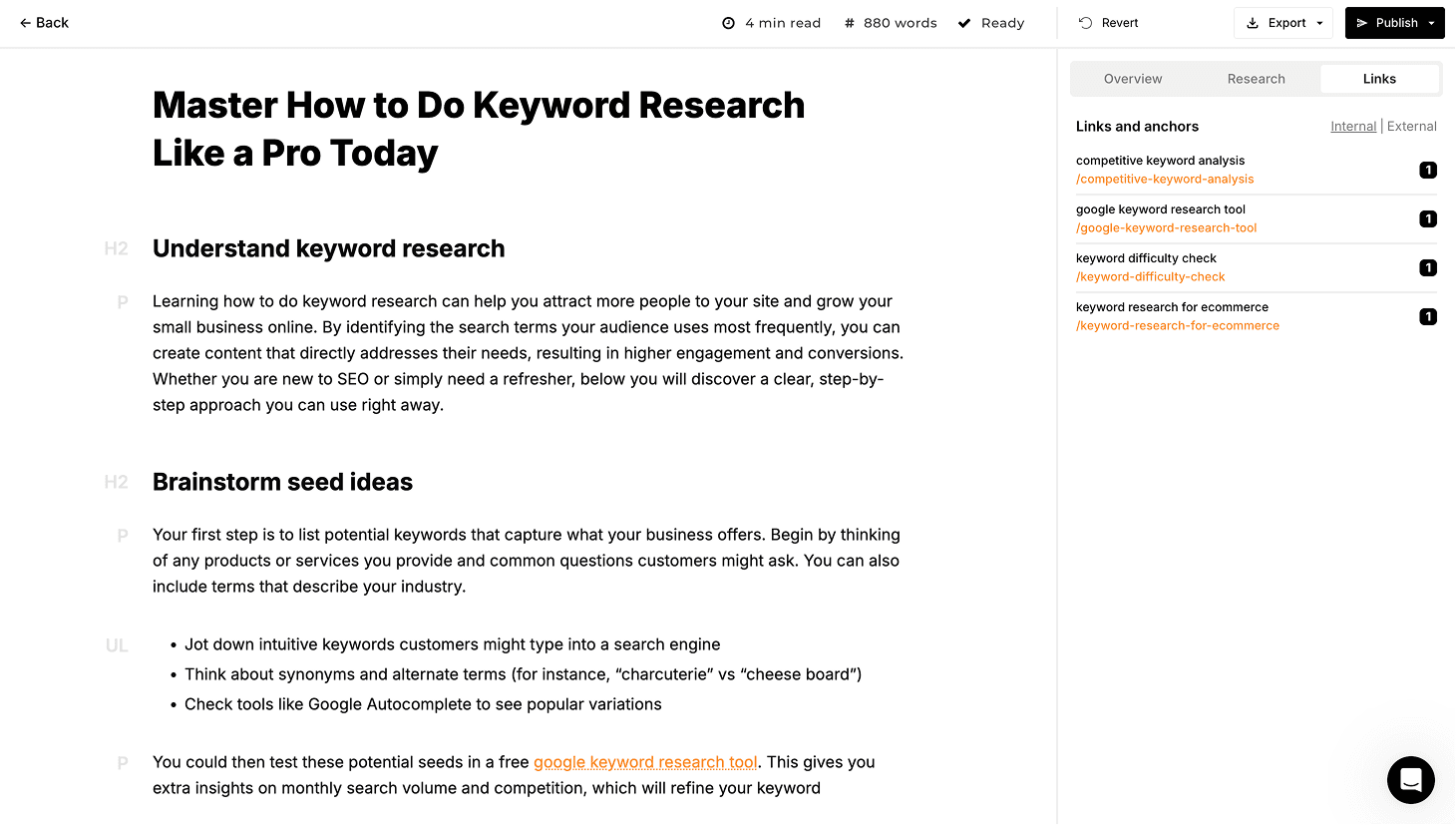
Machined enters workflows at a different layer than most writing or optimization tools. Instead of treating each article as an isolated task, it plans and executes content as interconnected systems built around search intent and topic coverage. Keyword research, clustering, long-form article generation, internal linking, and CMS publishing operate as a single pipeline. This removes the manual handoffs that typically break consistency at scale.
The platform assigns each article a specific function within the cluster (pillar, supporting, or long-tail), which reduces keyword overlap and reinforces relationships between pages through automated linking. Supporting pieces feed authority back to pillar content instead of competing with it. This keeps clusters focused and intentional as they grow.
The goal is not volume for its own sake, but coverage that builds over time. By structuring clusters around pillar topics and supporting content, Machined emphasizes depth and internal coherence rather than one-off wins. That approach suits teams that already understand what topics they want to own and need a way to execute that strategy reliably, without rebuilding the same research, linking, and publishing logic for every new article.
Machined's Usage-Driven Cost Model
Unlike Cuppa, which relies on external services for key research capabilities, Machined includes research, clustering, internal linking, and publishing logic natively.
Paid plans scale at $19, $49, $99, and $249 per month, unlocking rising article volumes, automation depth, and publishing features. AI generation is bundled in, so the all-in cost per article works out between $0.63 on Launch and $0.33 on Scale, with nothing extra to monitor. Teams publishing at higher volume can use the Bring Your Own Key (BYOK) plan instead: $99 per month for up to 2,000 articles, where content generation costs go directly to the AI provider via API usage and average around $0.20 per article — an approximate figure that varies with article length, research depth, images, and model choice. This keeps marginal costs transparent and avoids per-article markups.
At scale, Machined's pricing behaves linearly rather than exponentially. Producing 10 articles or 100 articles does not trigger artificial caps or pricing cliffs. This makes it attractive for teams building large content libraries or rolling out clusters across multiple topics.
GravityWrite vs. Machined
GravityWrite solves the problem of writing by shortening the path from idea to finished draft. Machined addresses execution at the topic level, where success depends on how individual pages work together rather than how quickly one page is produced.
GravityWrite answers how to create a single article effectively, while Machined answers how to compete for an entire subject through coverage, structure, and internal linking. The distinction becomes important once ranking depends less on output speed and more on authority built over time.
We Tried It. Here's Our Verdict
Testing confirmed that cluster generation worked as intended end to end. Defining a topic produced a structured set of supporting articles around a clear pillar, with each piece targeting a distinct intent rather than overlapping keywords. Internal links appeared naturally within the body content, using relevant anchor text instead of generic phrasing, and connections flowed both toward the pillar and across related pages.
Publishing to the CMS completed the loop without manual formatting or link cleanup. Articles arrived with internal links intact, metadata applied, and structure preserved from generation through publication. That removed the usual copy-paste steps and reduced the number of handoffs between drafting and deployment.
The BYOK pricing model kept costs predictable throughout testing. Article generation and research incurred direct API usage without hidden markups, and producing clusters did not trigger sudden pricing jumps or artificial caps.
The main tradeoffs: output quality varies depending on model choice and prompt configuration, and generated content benefits from editorial review before publishing, particularly for topics requiring nuance or technical accuracy. The platform is focused on SEO content clustering and doesn't handle ads, emails, social content, or broader marketing tasks.
Pros
- Automates clustering, linking, and publishing in a single workflow
- Transparent, low-cost generation via BYOK
Cons
- SEO-only focus, with limited support for non-search content
- Output quality depends on model choice and settings; editorial review recommended
Best for: Agencies and publishers building topical authority.
Enterprise and Autopilot Options
A different focus and a different decision
These tools serve a different purpose than most writing or execution platforms. They make sense when content decisions shift toward enterprise governance or hands-off automation rather than editorial control or publishing speed.
Jasper
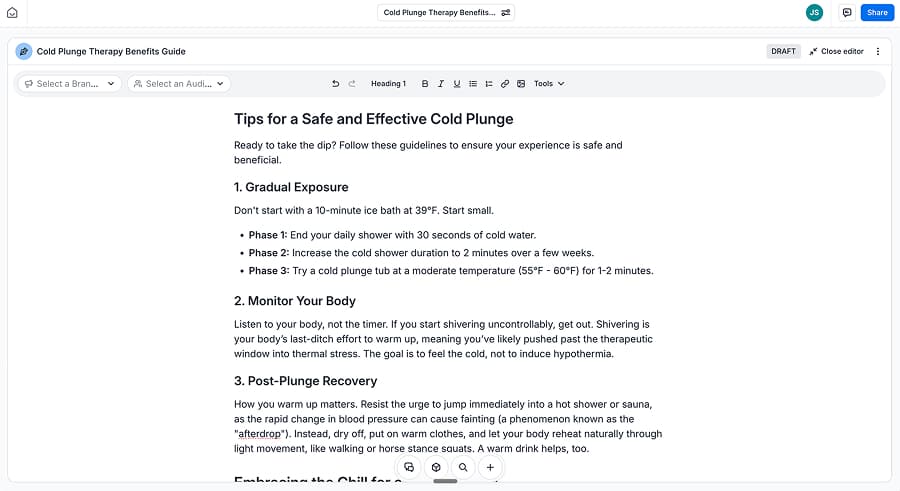
Jasper targets large marketing organizations that need brand governance, collaboration, and coordination across multiple channels. SEO content exists within that ecosystem, but it operates alongside use cases like product marketing, PR, sales enablement, and lifecycle campaigns. The platform prioritizes consistency, approvals, and brand controls over publishing speed, which makes it better suited for teams managing many contributors rather than teams focused on scaling search content specifically.
Jasper's Seat-Based Pricing Model
Jasper uses a per-seat pricing model, starting at $69 per user per month on the Pro tier. This entry level includes limited access to Jasper's core features but excludes many of the brand governance and automation tools that differentiate the platform. As a result, the Pro tier functions more as a relatively expensive introduction than a complete solution.
Full access requires a custom-priced Business plan, where costs scale with seat count and feature scope. For teams with multiple users, pricing compounds quickly, and Jasper becomes a significant fixed expense rather than a variable one.
Jasper's pricing makes sense when content creation is distributed across teams and governed by brand systems. It is less cost-effective for SEO-focused publishing where output volume matters more than organizational alignment. Teams usually reach this point once consistency, approvals, and cross-channel coordination become operational requirements rather than nice-to-haves.
GravityWrite vs. Jasper
Jasper and GravityWrite occupy very different parts of the content workflow. GravityWrite focuses narrowly on fast, one-click article generation with minimal decisions, which makes it attractive for teams prioritizing speed and volume at a predictable low cost. Jasper invests heavily in brand governance, collaboration, and multi-channel coordination, with SEO content being just one of many use cases.
As a result, Jasper's pricing and feature set make more sense for larger organizations with multiple contributors, approval layers, and strict style controls, but they can feel disproportionate for teams whose primary goal is high-speed SEO publishing. In practice, organizations that value editorial consistency and cross-team integration may choose Jasper when GravityWrite's simplicity becomes limiting, whereas teams that need fast, topic-focused content at scale often find GravityWrite, or a tool focused on search authority, a better fit.
We Tried It. Here's Our Verdict
In testing, Jasper produced polished, readable output that aligned well with brand tone and stylistic consistency. Drafts flowed smoothly, avoided obvious templating, and required minimal surface-level editing before review.
However, SEO depth lagged behind more specialized tools. SERP alignment, intent separation, and topic coverage felt secondary to narrative quality, and drafts often needed additional optimization work to compete in search environments where structure, specificity, and coverage breadth matter.
That gap reflects Jasper's core design priorities rather than a failure of execution. Jasper excels as a brand system built to coordinate content across teams, channels, and campaigns, not as a ranking engine tuned for search performance. SEO content fits comfortably inside that ecosystem, but it does not drive the platform's feature decisions in the same way it does for SEO-first tools.
For teams measuring success by brand consistency and cross-channel alignment, that tradeoff makes sense. For teams measuring success by rankings and organic visibility, it becomes a limiting factor. The distinction usually shows up once search performance, not presentation, drives content decisions.
Pros
- Strong brand governance and tone consistency across teams
- Designed for collaboration and multi-channel marketing workflows
Cons
- High entry cost compared to SEO-focused tools
- Limited depth for search-driven content and ranking optimization
Best for: Enterprise teams managing multiple content channels.
SEO.ai
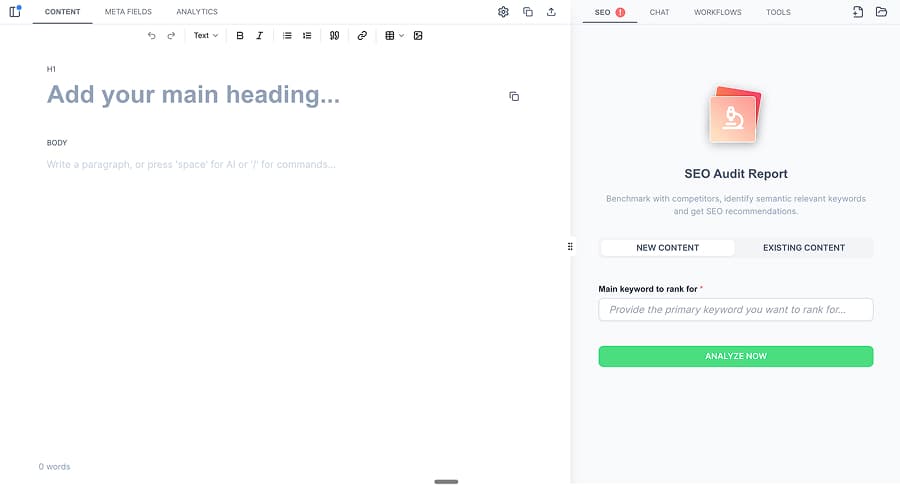
SEO.ai prioritizes automation above all else, positioning itself as a set-and-forget content system rather than an editorial workspace. The platform analyzes an existing site, generates a content calendar, writes articles on a fixed cadence, and publishes them automatically with minimal intervention.
Decisions about structure, depth, and keyword focus largely happen up front, after which the system runs on its own. That approach appeals to teams that want predictable output without ongoing involvement, but it also limits opportunities to steer strategy once execution is underway.
How SEO.ai Prices Hands-Off Execution
SEO.ai follows a site-based pricing model, starting at $149 per month for a single site. This includes automated content generation, internal linking, and publishing, with a fixed cadence of approximately eight articles per month. This cadence is designed for consistency rather than scale.
Higher tiers scale by site count rather than article volume: $299 per month for three sites, $499 per month for five sites, and $740 per month for 10 sites. Each site is locked to a single language, and output volume remains largely fixed regardless of plan. That structure favors breadth across properties over deeper production on any single site.
The pricing aligns with a hands-off operating model rather than active optimization. Costs reflect convenience and consistency, not fine-grained control. The approach suits teams that are comfortable letting the system run on its own, but it can feel restrictive for those who want to adjust strategy as performance data comes in.
GravityWrite vs. SEO.ai
GravityWrite and SEO.ai both aim to reduce the effort required to publish content, but they do so in very different ways. GravityWrite simplifies content creation by focusing on fast, one-click generation with minimal setup, making it suitable for teams that want immediate drafts and predictable output without strategy layers. SEO.ai builds an automated publishing pipeline, taking a site URL, generating a calendar, writing content, linking internally, and publishing on a fixed cadence with little ongoing user direction.
The former gives writers control and flexibility at the article level. The latter gives organizations convenience and consistency at the site level. For teams that want to steer strategy and refine drafts, GravityWrite's simplicity feels empowering. For teams that want to set a system in motion and let it run without hands-on involvement, SEO.ai delivers a more autonomous, if less customizable, solution.
We Tried It. Here's Our Verdict
Setup was quick, with the platform requiring little more than a site URL to begin generating content. Localization stood out as a genuine strength, with articles naturally reflecting regional language, services, and context without needing manual prompts. Content tied back to the business accurately, referencing offerings and positioning in a way that felt deliberate rather than generic. For teams looking to get content live with minimal setup, the onboarding experience removed nearly all the friction.
That simplicity came at the cost of refinement. Configuration options for structure, depth, research inputs, and strategic emphasis remained limited once the system was running. Articles followed a fixed length and cadence, and adjustments required waiting for scheduled refresh cycles rather than iterating in real time.
In practice, the platform favored consistency and automation over optimization, which worked well for hands-off publishing, but would be constraining for teams that want to fine-tune content based on performance or competitive shifts.
Pros
- Fully automated publishing with minimal ongoing input
- Strong localization and business-aware content generation
Cons
- Limited configurability for structure, depth, or strategy
- Fixed output cadence restricts iterative optimization
Best for: Small businesses prioritizing hands-off execution.
Comparison Chart
| Tool | Pricing | Core Strength | Main Limitation | Best Use Case |
|---|---|---|---|---|
| GravityWrite | $19–$79/mo | One-click generation | No clustering | Fast drafts |
| Frase | $49–$299/mo | Research and refresh | Article caps | Content updates |
| Scalenut | $59–$199/mo | Structured drafts | Basic strategy | SEO drafting |
| Writesonic | $49–$499/mo | Full SEO platform | Slow output | Consolidation |
| Cuppa | $38–$250/mo | Editor UX | Gated research | Article control |
| Machined | $19–$249/mo | Topic systems | SEO-only | Authority building |
| Jasper | $69+/seat | Brand workflows | Cost | Enterprise teams |
| SEO.ai | $149–$740/mo | Autopilot SEO | No control | Hands-off SEO |
Pricing as of February 2026. Many tools offer discounts for annual billing.
TL;DR
Closest like-for-like GravityWrite replacement: Scalenut. Preserves GravityWrite's emphasis on fast, structured draft creation while adding stronger completeness and SEO guidance without introducing heavy strategy overhead.
Best for research-first workflows: Frase. Prioritizes SERP research, outlining, and content alignment before generation, making it a better fit when framing and intent matter more than raw speed.
Best for consolidating your tool stack: Writesonic. Combines research, audits, tracking, and content generation in a single platform, reducing reliance on multiple SEO subscriptions.
Best for building topical authority: Machined. Plans and executes content as interconnected clusters, using keyword research, internal linking, and publishing automation to build authority at the topic level rather than page by page.
Best tool to pair with GravityWrite: Machined. Complements GravityWrite by handling strategy, clustering, and execution across topics while GravityWrite remains focused on fast, individual page creation.
Bottom Line: GravityWrite streamlines content creation, but efficiency alone does not remain the primary constraint for teams indefinitely. Alternatives become relevant when teams need stronger drafts, clearer strategy, or systems that scale beyond individual pages. The right choice depends on whether the bottleneck sits in writing, planning, consolidation, or authority building. In many cases, the most effective move is pairing GravityWrite with a tool designed to handle what comes next.
About the Authors

Machined Content Team
AuthorOur content team combines detailed research and industry knowledge to create comprehensive, unbiased, and useful articles for anyone ranging from small business and startup owners to SEO agencies and content marketers.
Nick Wallace
ReviewerLong time SEO professional with experience across content writing, in-house SEO, consulting, technical SEO, and affiliate content since 2016. Nick reviews all content to ensure accuracy and practical value.