SERP analysis
SERP analysis shows you how your article stacks up against the pages already ranking for your target keyword. Machined.ai runs it on every article, as the first step of writing (Analyzing competitors in the progress checklist).
You'll find it in the SERP analysis section of the right panel in the article editor.
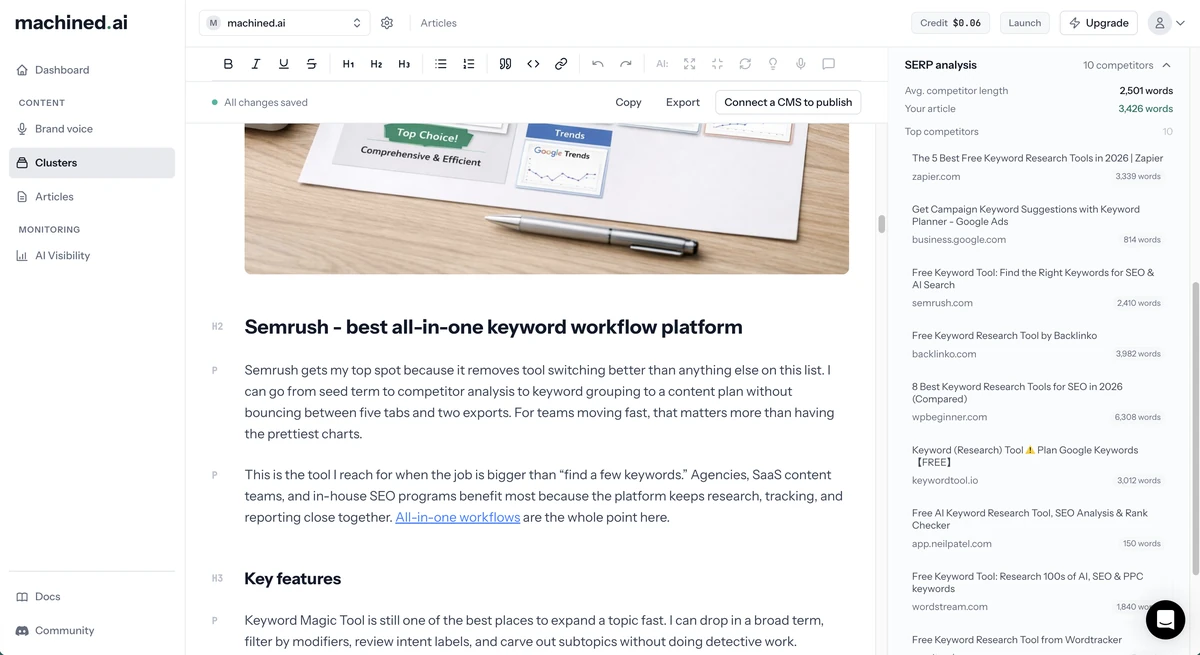
Competitive insights
- Avg. competitor length: the average word count of the top-ranking pages
- Your article: your article's current word count. It's shown in green when your article is at least 80% of the competitor average.
Use this to quickly gauge whether your article is in the right range for your target keyword. When an article's length is set to Auto, Machined uses the competitor average as its target.
Top competitors
A list of the top-ranking pages for your keyword, showing each page's title, domain and word count. Use this to understand what you're competing against and identify any content gaps.
Notes
- SERP analysis uses the article's country and language, so you see the pages ranking in your market.
- Forums, social media and video sites aren't included.
- If no ranking pages could be analyzed, you'll see No SERP data available.