AI Visibility
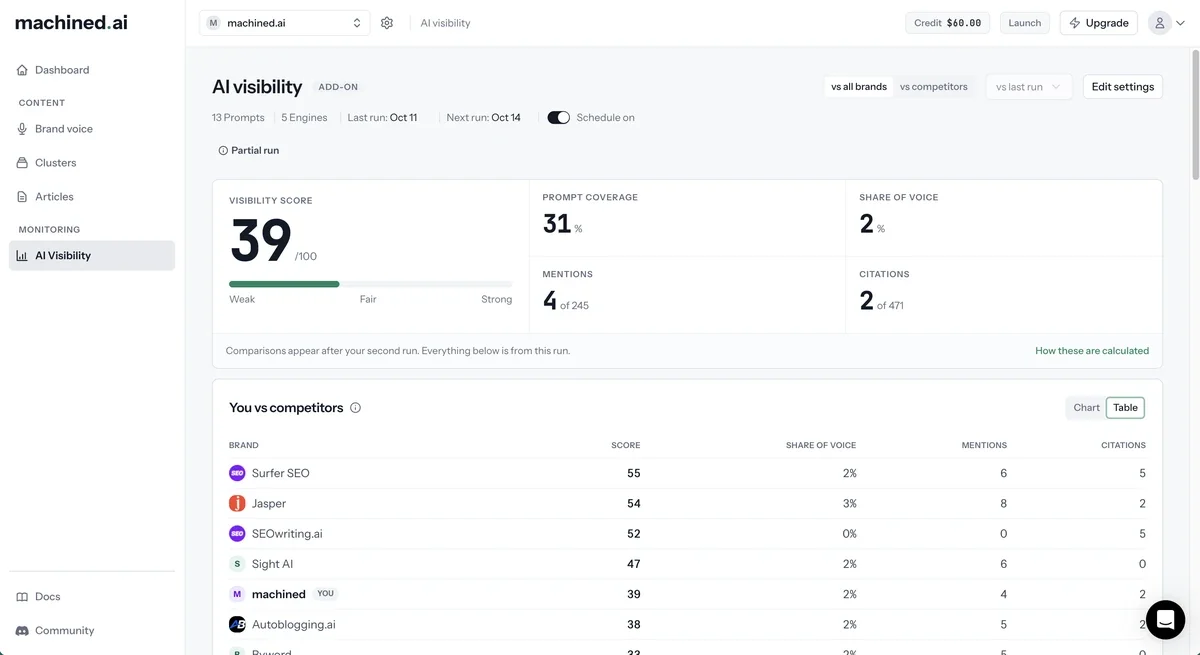
AI Visibility shows you whether AI engines recommend your brand when your customers ask them questions. You choose the questions (prompts) your customers would ask, Machined.ai puts them to each AI engine, and the dashboard shows how often you're named, cited and compared against your competitors.
To open it, select a project and click AI Visibility under Monitoring in the sidebar.
What it tracks
Each run asks every prompt on every engine you've selected. The available engines are:
- AI Overview (Google)
- ChatGPT
- Claude
- Gemini
- Perplexity
- Grok
From the answers, Machined works out your visibility score, how many prompts you appear in, your share of voice, how often you're mentioned and cited, the sentiment of what's said about you, and which sources the engines rely on. See Reading your AI Visibility dashboard for what each figure means.
Each project has its own AI Visibility setup, with its own prompts, engines, schedule and competitors.
Who can do what
| Action | Owner | Admin | Editor |
|---|---|---|---|
| View the dashboard | ✓ | ✓ | ✓ |
| Set up, change settings and start runs | ✓ | ✓ | |
| Add credit | ✓ | ||
| See the credit balance, scheduled runs and activity | ✓ | ✓ | ✓ |
Editors see "An admin can set this up." in place of the setup button. See Members and roles for more on roles.
Pricing and credit
AI Visibility is an add-on. It isn't included in your plan and is paid for separately from a prepaid credit balance, so it's available on every plan, and in read-only workspaces too, such as after a free trial ends.
How a run is priced
A run is charged per check: one prompt asked on one engine. Each engine has its own price:
| Engine | Price per check |
|---|---|
| AI Overview | 1c |
| Perplexity | 1.5c |
| ChatGPT | 2.5c |
| Claude | 5c |
| Gemini | 5c |
| Grok | 8c |
Prices as of October 2026; the app always shows current prices next to each engine.
The cost of a run is the number of prompts multiplied by the combined price of the engines you've selected. The full cost is taken from your credit when the run starts.
Example
20 prompts on AI Overview, ChatGPT and Claude costs 20 × (1c + 2.5c + 5c) = $1.70 a run. Run weekly, that's about $7.30 a month.
You'll always see the cost before you start. The setup dialog and the Cost and credit card in settings show the price per run and, for scheduled runs, an estimate per month.
Credit
- Every workspace gets $2 of free credit to start, enough for a first run with the suggested prompts and default engines.
- Credit is shared across all projects in your workspace.
- Credit never expires. It's spent when a run starts.
- Only the workspace owner can add credit. Top-ups are available in $10, $30, $60 and $120 amounts.
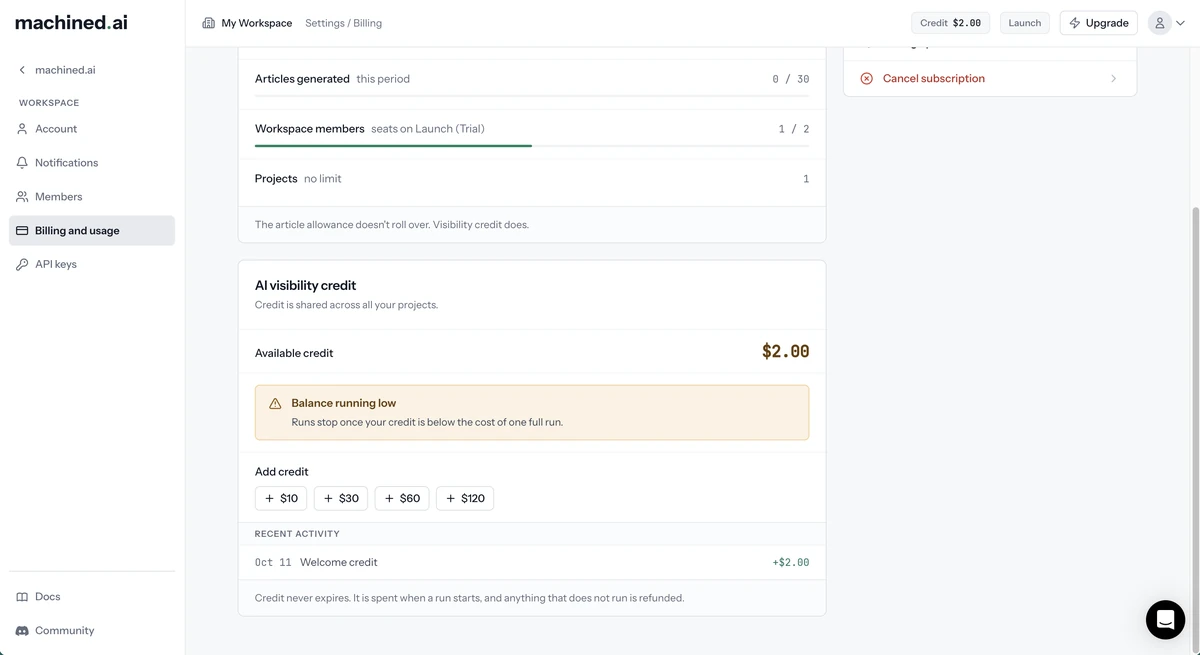
To add credit, go to Settings → Billing and usage and use the AI visibility credit card. You can also click the Credit chip in the top bar and select Add credit.
Refunds
You only pay for results you can see:
- If a few checks in a run don't return results, you'll still see the run, marked as a partial run, and you're refunded for the checks that didn't run.
- If too many checks are missing to give a reliable picture, or the run fails, the run isn't shown and you're refunded in full.
When credit runs out
A run won't start if your balance is below its cost. Nothing is charged.
If you're on a schedule and a scheduled run is skipped for lack of credit, the workspace owner gets an email. After five scheduled runs in a row are skipped, the schedule is paused and you'll see a Schedule paused notice in settings. As soon as credit is added, the schedule restarts automatically. You can still start a one-off run at any time.
Emails
The workspace owner receives an email when:
- the credit balance is running low
- a scheduled run is skipped because there isn't enough credit
- a schedule is paused after repeated skipped runs
Billing and activity
The AI visibility credit card on Settings → Billing and usage shows:
- Available credit
- Add credit (owner only)
- Scheduled runs: each project's schedule and whether it's on, off or paused
- Recent activity: top-ups, free credit, monitoring runs and refunds
How long answers are kept
The full text of each AI answer is kept for 90 days, so you can read exactly what each engine said. After that, a short excerpt is kept along with all of your scores and results.
Next steps
- Set up AI Visibility: run your first check
- Reading your AI Visibility dashboard: understand the results and settings