API Modes
Machined offers two modes for AI-powered content generation. You can switch between them at any time in Settings → API Keys.
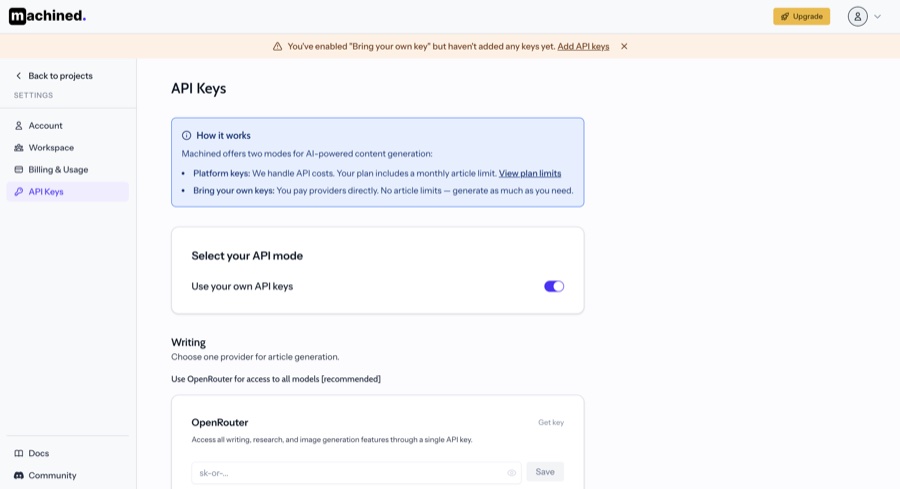
Platform key
By default, your workspace uses Machined's platform key. We handle all API costs and your plan includes a monthly article limit.
- No setup required
- Article generation counts against your monthly limit
- Limit resets each billing period
This is the recommended mode for most users.
Bring your own key (BYOK)
If you'd prefer to use your own API key, you can switch to BYOK mode. You pay your API provider directly and there are no article limits.
- No monthly article limits — generate as much as you need
- You are billed directly by your API provider based on usage
- Supports OpenRouter, OpenAI, Anthropic, Google, and Perplexity
Setting up BYOK
- Go to Settings → API Keys
- Toggle on Use your own API keys
- Add your API key for your chosen provider
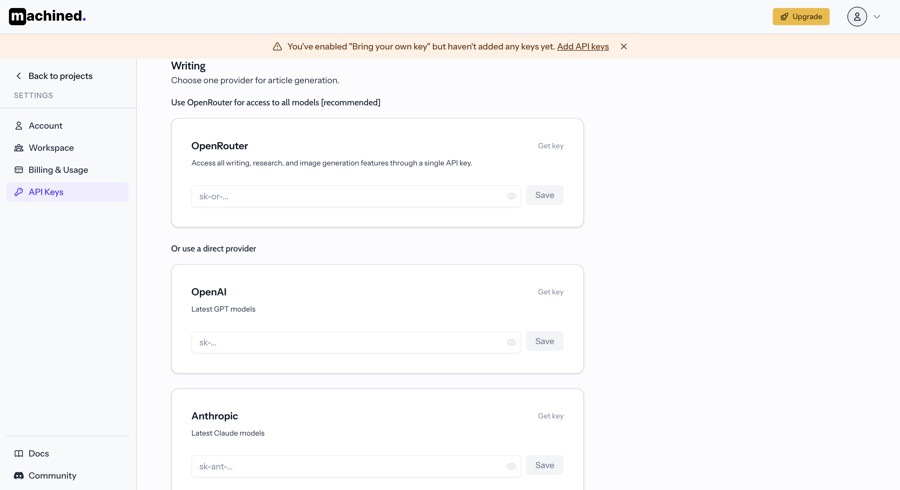
We recommend OpenRouter for BYOK — it gives you access to all supported models through a single API key, including models from OpenAI, Anthropic, and Google.
Switching modes
You can switch between platform key and BYOK at any time. Switching takes effect immediately for any new content generation.
Legacy users
If you signed up before the new plans launched, your workspace is on BYOK mode by default. This is because usage costs were not included in legacy pricing.
Legacy workspaces are also limited to OpenAI as their API provider. To access additional providers (Anthropic, Google, Perplexity, OpenRouter), upgrade to a current plan which will switch you to platform key mode — or you can continue using BYOK with OpenRouter to access all models through a single key.