Publishing
Publish articles directly to WordPress, Webflow, Framer, Ghost, HubSpot, Shopify, Wix or a webhook from Machined.ai. Before publishing, connect a destination. See the platform guides below.
Publishing a single article
- Open a written article in the editor
- Click Publish in the bar above the article
If you haven't connected a destination yet, you'll see Connect a CMS to publish instead, which takes you to your project's integrations.
You can also publish from a cluster: open the article's menu in the cluster table and click Publish article.
The publish dialog
Choose a destination
If your project has more than one destination (for example a WordPress site and a webhook), pick the one to publish to. If there's only one, Machined skips this step.
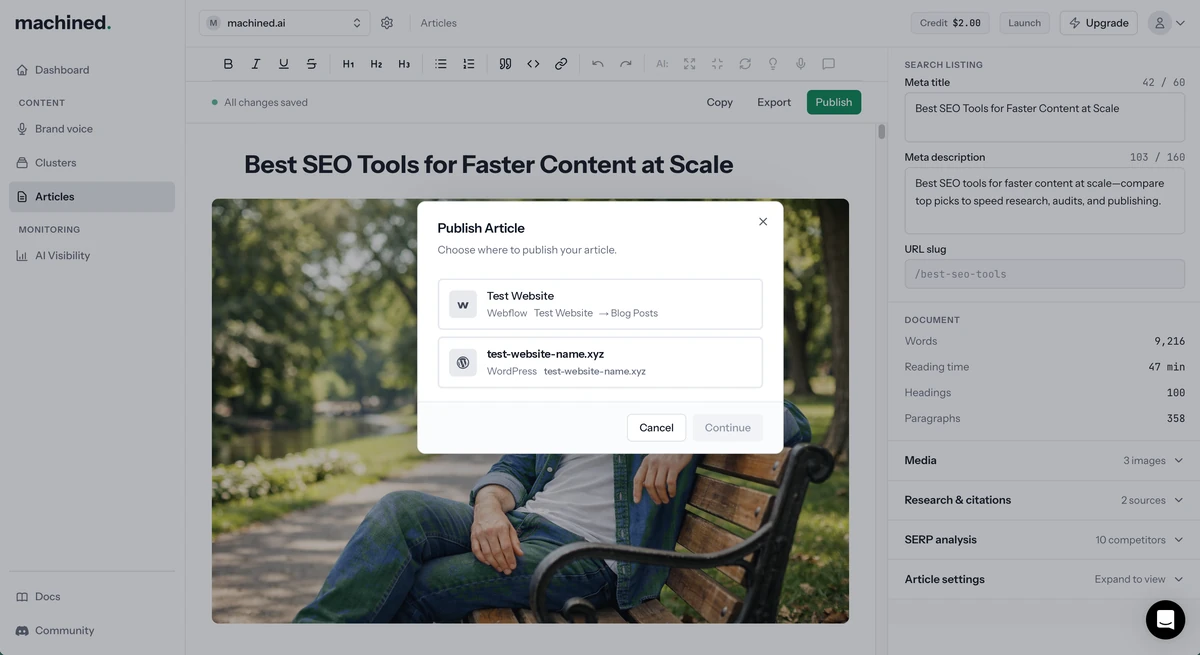
Configure
For a CMS, choose a Publish status and any platform options. See the platform guides. For a webhook, confirm that you want to send the article.
Publish
Click Publish. When it's done, you'll see Posted!.
If something goes wrong, you'll see Publishing Failed with an explanation, a Try Again button and a link to troubleshooting steps for your platform.
Publish status options
- Publish live: published immediately and publicly visible
- Save as draft: saved to your CMS as a draft, not publicly visible
Webhooks don't have a draft option. The article is sent to your endpoint, and what happens next is up to you.
Publishing in bulk
You can publish several articles at once from a cluster:
- Open the cluster and select the articles using the checkboxes
- Click Publish (n): either the main button, when none of the selected articles still need writing, or the option in the ⋮ menu
- Choose your destination and options, then confirm
Only articles that have been written and not yet published are sent. Bulk publishing works with every CMS and with webhooks.
The Articles page doesn't have a publish option. Open the article and publish from the editor.
Posted doesn't always mean live
Once an article has been published, its status changes to Posted. This is true whether you published it live or saved it as a draft. Posted means the article is on your CMS, not necessarily that it's public.
Warnings after publishing
Sometimes an article publishes but part of it couldn't be sent. In that case the success screen lists warnings, for example a featured image that couldn't be uploaded, or images in the article that had to be left out. Check the post in your CMS and add anything that's missing.
Republishing and unpublishing
Once an article has been published, the editor shows Republish and Unpublish in place of Publish. Both are also in the article's menu on the cluster page and the Articles page.
Republish
Republish updates your existing post with the latest version of the article. The URL stays the same, and a draft stays a draft while a live post stays live. For a webhook, the article is sent to the same webhook again.
Use Republish after editing an article in Machined, so your site reflects the changes.
Unpublish
Unpublish resets the article's publish status in Machined so you can publish it again as a brand-new post, for example to a different destination.
Unpublish doesn't remove the post from your site. If you want it gone, delete it in your CMS as well.
You can unpublish several articles at once by selecting them and choosing Unpublish (n) on the cluster page, or Unpublish on the Articles page.
One CMS per article
To avoid duplicate posts, an article can only be published to one CMS connection. If you try to publish it to a different connection, Machined will stop you and suggest exporting the article instead.
To publish it somewhere else, Unpublish it first, or export it (see Exporting). Removing the CMS connection it was published to also frees it up.
Read-only workspaces
If your workspace is read-only (for example, after a trial ends), publishing opens an upgrade prompt instead. See Billing and plans.
Platform guides
| Platform | Connect | Publish |
|---|---|---|
| WordPress | Connecting to WordPress | Publishing to WordPress |
| Webflow | Connecting to Webflow | Publishing to Webflow |
| Framer | Connecting to Framer | Publishing to Framer |
| Ghost | Connecting to Ghost | Publishing to Ghost |
| HubSpot | Connecting to HubSpot | Publishing to HubSpot |
| Shopify | Connecting to Shopify | Publishing to Shopify |
| Wix | Connecting to Wix | Publishing to Wix |
| Webhook | Set up in the publishing guide | Publishing via webhooks |