Configuring API Keys
By default, your workspace uses Machined's platform key — no setup required. If you'd prefer to use your own API key (BYOK), this guide explains how to set that up.
See API Modes for a full explanation of the difference.
Switching to BYOK
- Go to Settings → API Keys
- Toggle on Use your own API keys
- Add a key for your chosen provider
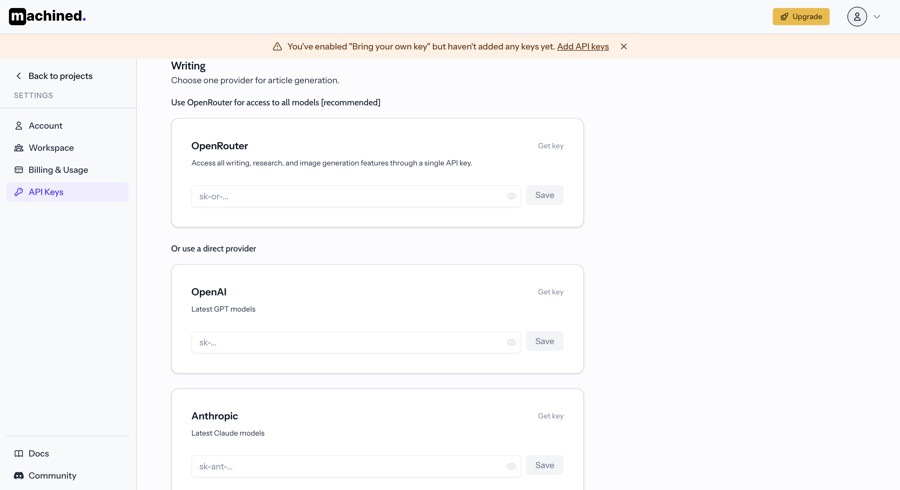
We recommend OpenRouter as your provider — it gives you access to all supported models (OpenAI, Anthropic, Google, and more) through a single API key.
OpenRouter (recommended)
OpenRouter is a unified API that routes requests to multiple AI providers. One key covers all writing, research, and image generation features in Machined.
- Sign up at openrouter.ai
- Go to Keys and create a new API key
- Paste the key into the OpenRouter field in Settings → API Keys
- Click Save
OpenAI
- Sign up at platform.openai.com
- Go to API Keys and create a new secret key — leave permissions set to All
- Paste the key into the OpenAI field in Settings → API Keys
- Click Save
Machined requires an OpenAI Platform account — a ChatGPT or ChatGPT Plus subscription will not work. Your Platform account must have billing enabled and be on Tier 1 or above.
Anthropic
- Sign up at console.anthropic.com
- Go to API Keys and create a new key
- Paste the key into the Anthropic field in Settings → API Keys
- Click Save
Google
- Go to aistudio.google.com
- Click Get API key and create a new key
- Paste the key into the Google field in Settings → API Keys
- Click Save
Troubleshooting
If your key isn't being accepted, common causes are:
- Incorrect key — copy it again directly from your provider's dashboard
- Wrong account type — for OpenAI, you need a Platform account with billing enabled, not ChatGPT
- Restricted key — make sure the key has full permissions, not restricted ones
- Insufficient credits — check your provider account has a payment method and available balance
Intermittent errors
AI provider APIs occasionally experience intermittent errors — slow response times, unresponsive models, or full outages. Check your provider's status page if you're seeing unexpected failures:
There is nothing Machined can do to work around provider-side outages — if a provider is down, wait for them to recover.
Rate limits
Providers impose rate limits to prevent any one account from overwhelming their infrastructure. When a rate limit is hit, Machined uses an exponential backoff strategy — it pauses and retries automatically, as recommended by the providers. However, if the limit is hit too many times in a row, the article will fail with a final error.
If you're hitting rate limits frequently, upgrading your plan with the provider (moving to a higher usage tier) will raise your limits.
Key security
Your API keys are encrypted at rest and in transit using AES-256. Once saved, a key is never stored or transferred in plain text — two separate security secrets stored on separate servers are required to decrypt it on each use.